How to Replace Your Workout Tracking App With One You Build Yourself
Workout tracking apps are some of the best-designed software on a phone. Boostcamp, Strong, Hevy, Fitbod and JEFIT each have real teams behind them, real programs written by real coaches, and years of polish. This guide is not an argument against them.
It is for one specific person: someone who opens the app, logs sets and reps, checks last week's numbers, and closes it. If that describes you, the part of the app you use is small enough to build yourself with an AI coding tool, and the data you would be building around is already yours. Here is how to do it, from export to a working app on your phone, with the tradeoffs stated plainly.
A few links in this post are affiliate links. They cost you nothing and they keep this site free.
What these apps charge, and what you are paying for
| App | Paid tier (roughly, at time of writing) | What the paid tier adds |
|---|---|---|
| Boostcamp Pro | $11.99 per month | Coach-written programs, full history |
| Strong Pro | About $5 per month or $30 per year | Unlimited routines, charts |
| Hevy Pro | About $4 per month | Unlimited routines, full analytics |
| Fitbod | About $13 per month | Workouts generated for you |
| JEFIT Elite | About $13 per month | Ad-free, charts, custom plans |
Prices change, so check before you decide. The point of the table is the shape, not the numbers. Each app has a free tier that holds back history, charts, or program depth, and a paid tier that unlocks them.
Keep the subscription if you use: the coach-written programs, the exercise video library, the social feed, or the auto-generated workouts. Those are real work by real people and a self-built app will not have them.
Consider building if you use: the log, the history, the "what did I do last time" view, and the progress chart. That is a form with two number fields, a calendar, and a line chart. It is a weekend project.
Step 1: Get your history out
This is the step that matters most, and the one most people skip. Years of sets and reps are the valuable part. Everything else is a shell around them.
If the app has an export, use it. Strong and Hevy both export CSV from settings. Do this before anything else.
If it does not, the web version usually has the data anyway. Boostcamp has no export button, but its web app loads the full history into the page in one request. Anything a web page can display, an AI tool with browser access can read out and save as a file. In testing, a five-year Boostcamp history came out as a single JSON file in about ten minutes: every workout, every exercise, every set with weight and reps.
Two things to check once the file is on your machine:
- •Which field is the real number. Exports often carry both the target the program prescribed and the value actually logged, side by side. Confirm which is which against a workout you remember before trusting any records computed from it.
- •Outliers. Apps store placeholders (a 1 lb "bodyweight" marker, for example) and people make typos (135 where 45 was meant). Ask the AI to flag any set far above the surrounding sessions for that exercise, and clean them before records are calculated. A few dozen bad sets out of ten thousand is normal.
Step 2: Ask questions of it before you build anything
The first payoff from owning the data comes before the app exists. With the file on your machine, an AI model can read the whole history and answer questions no subscription app will: which exercises you actually complete versus skip, where your estimated max on each lift has been heading, which muscle groups are getting thin, how your training volume has moved against your body weight if you track that elsewhere.
Give it your goals and your constraints. Age, injuries, joints that complain, lifts you have decided not to do. The answers will shape what the app should contain. Most people find that the program they were "following" and the program they were actually doing are two different things, and the second one is the right starting point for a build.
Step 3: Build the replacement
Describe the app in plain words to an AI coding tool. Not the features you have seen in other apps. Your workout. What you want to see when you open it, what you want to tap between sets, what should happen when you set a record.
A single HTML file with a small database behind it is enough. It can live at a private URL and be added to a phone's home screen, where it opens full-screen like any other app. Import the full history on day one so suggested weights and records are populated from the first session.
Here is what a build of that description looks like after a couple of weeks of real use and feedback:
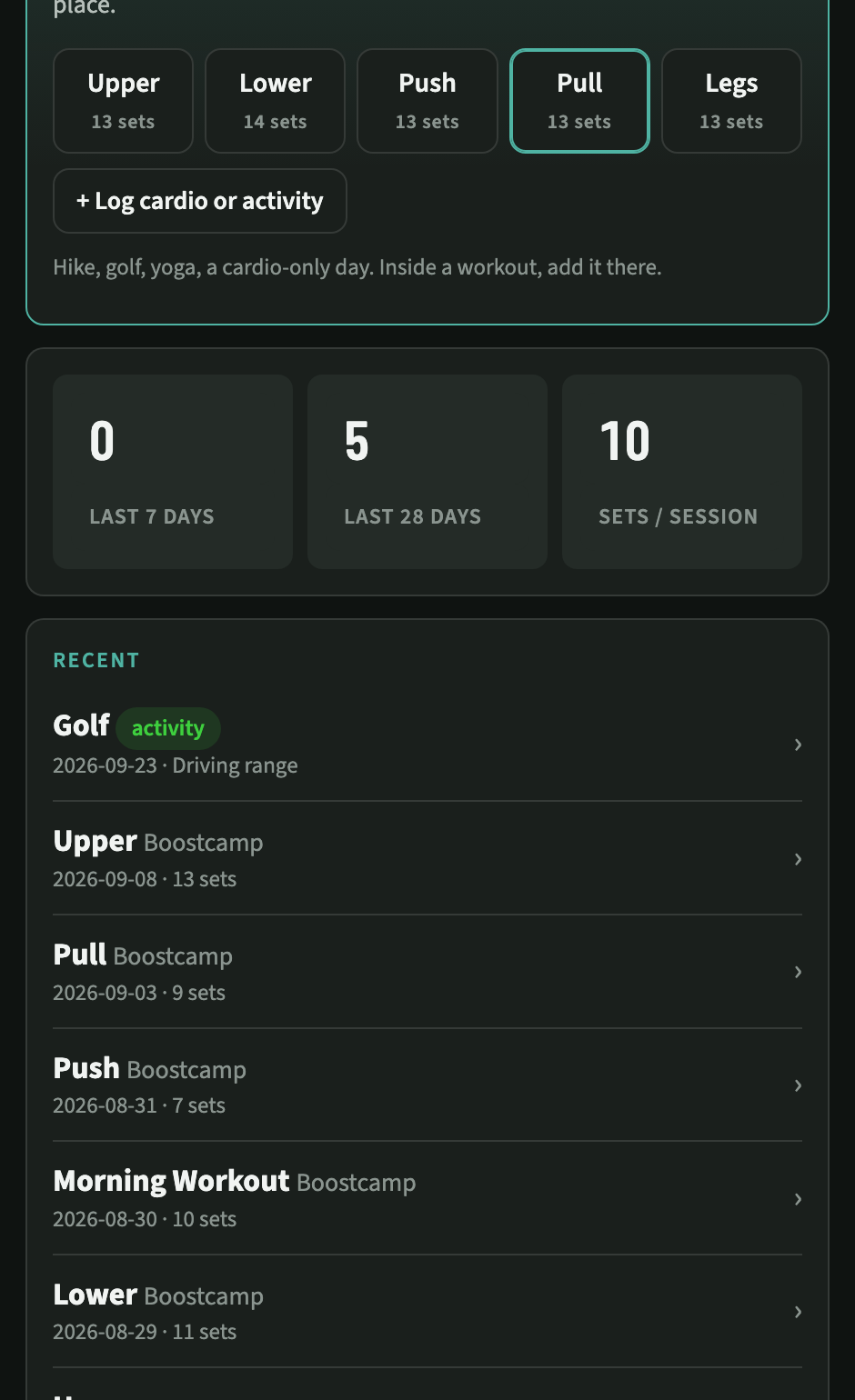
A rotation instead of a calendar. Five days that cycle in order. Train two days in a row one week and skip the next, and the app simply holds its place, with a warning if the next day would hit a muscle group trained yesterday.
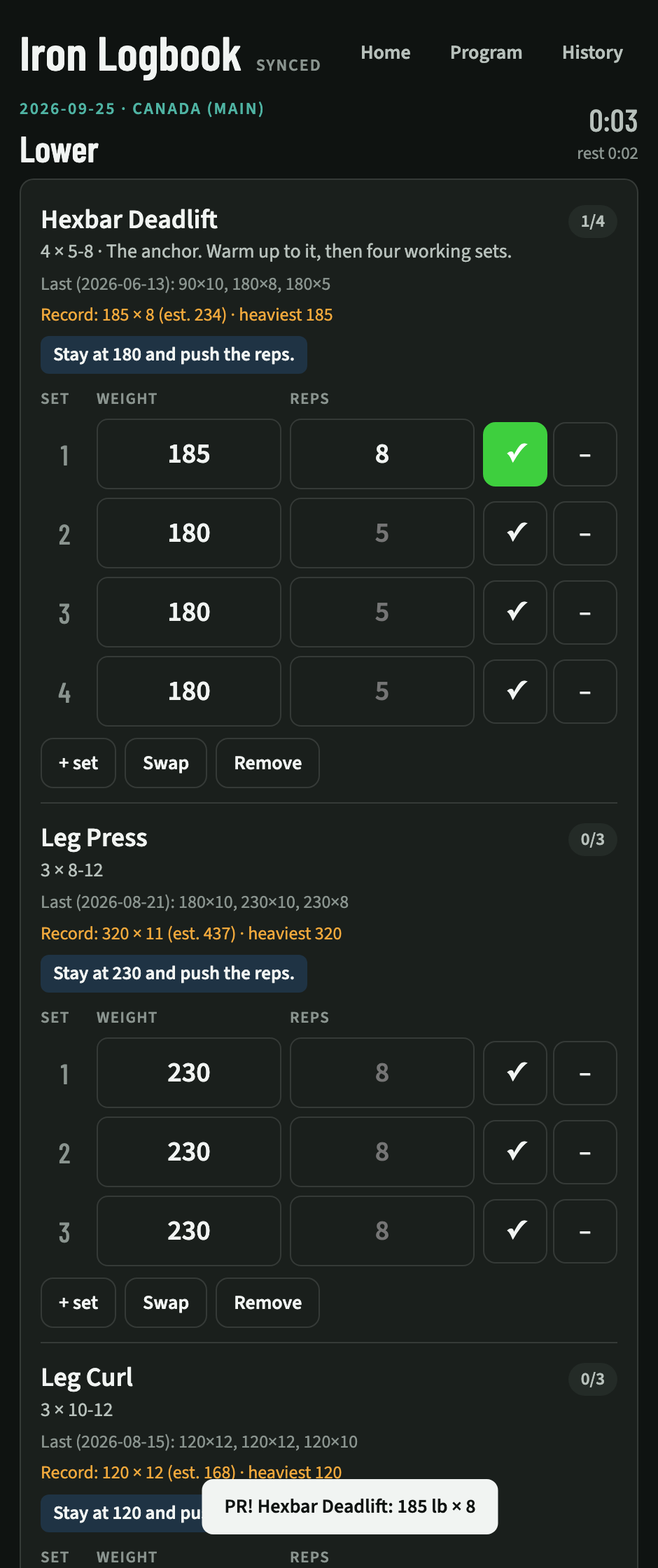
Last time, the record, and a suggestion on every exercise. The suggested weight comes from the last session. Hit the top of the rep range on every set and it tells you to go up. The current record sits right there to chase on a good day.
Records per gym. Machines at different gyms do not agree with each other. Tracking records and suggestions per location stops a stiff machine from producing a fake personal record.
A celebration when a record falls. The moment a set beats the previous best, the app says so, loudly. This is the one feature people ask for most, and it costs nothing to add.
Skip with a reason. Machine busy, joint says no, out of time. A skipped set is data, and the reason is more useful than the skip.
It wraps itself up. Forget to tap finish and walk out, and the session closes on its own after 30 minutes of no activity.
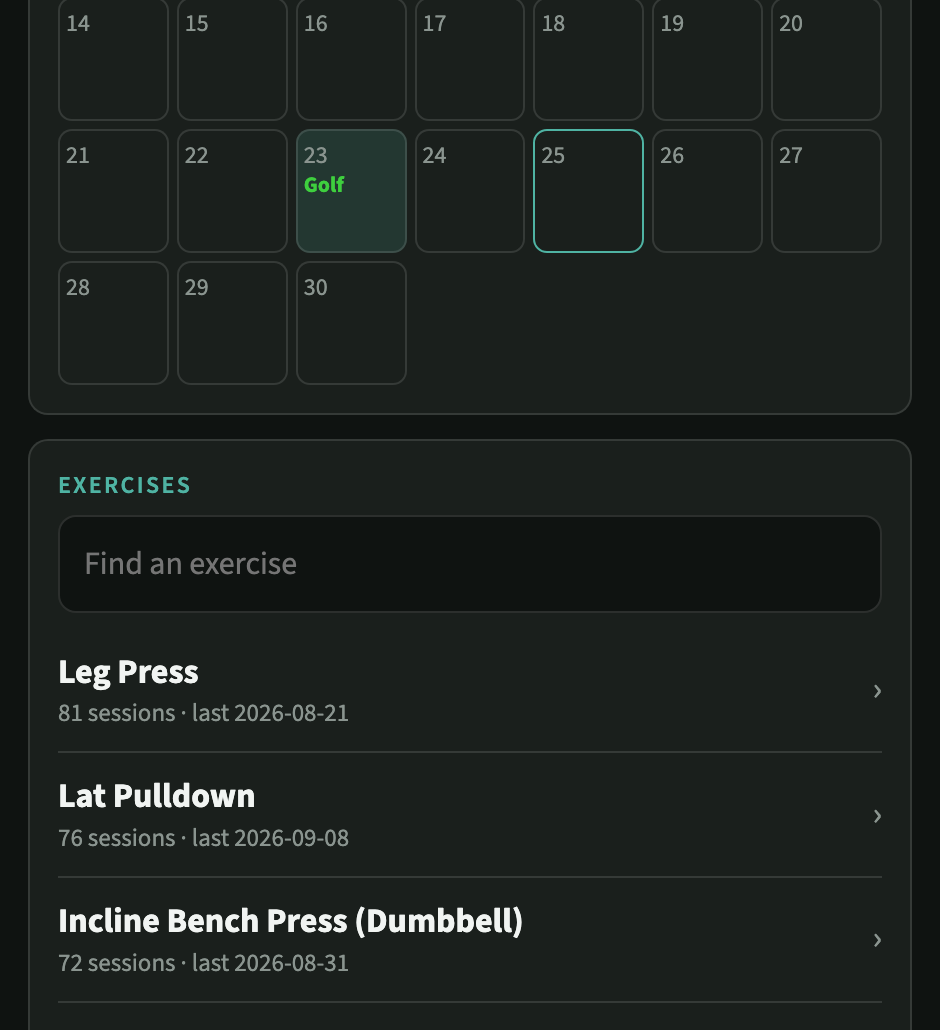
A calendar with everything on it. Lifting days, cardio minutes, and activities like golf, hiking and yoga, which count for something even when they are not a gym session.
None of this is exotic. Each item was one sentence of feedback after a real session, turned into a change the same day. That loop is the real advantage over a subscription app: it becomes yours in a way a product built for a million users never can.
What it costs to run
Built as a Claude artifact, the app and its database are included with the Claude subscription you may already have. To own the hosting outright, the same app is one HTML file plus a small database, which is a few dollars a month on Railway. Either way, the ongoing cost is a fraction of the subscription apps, and the data stays under your control.
Step 4: Automate the inputs you used to type
Two things people log by hand that a phone already knows: daily steps and cardio.
Steps. An iPhone counts them. A short Shortcut can run every night, sum the day's steps from Apple Health, and post them to a Google Form that feeds a tab in a spreadsheet. No app, no subscription, no manual entry. Build it to resend the last seven days on every run, so a night the phone was idle gets filled in by the next successful run. Google Sheets and Shortcuts are free. Fair warning: the Shortcuts app is fiddly, and the variable picker will fight you. Having an AI read your screenshots and tell you which pill to tap is the difference between finishing in an evening and giving up.
Cardio and activities. Log them in the app, inside a workout or as a standalone day. A hike, a round of golf, twenty minutes on the rower. Everything lands on the same calendar.
If Shortcuts is more friction than you want, the same pipeline runs cleanly as a webhook workflow on n8n Cloud: the phone posts to a webhook, the workflow appends the row.
Step 5: Keep the master record boring
The most durable place for a training record is a spreadsheet. One row per day, a few columns, no vendor. The app should feed it, not replace it. An AI tool can sync the app's sessions into the sheet in whatever format the sheet already uses, in a couple of minutes, whenever asked.
That is the pattern worth copying for any SaaS you kill. Own the record in the most portable format available and let the fancy tools feed it. When the next app shuts down or doubles its price, nothing is lost.
What you end up with
| Subscription app | Self-built | |
|---|---|---|
| Monthly cost | $4 to $20 | $0 to a few dollars for hosting |
| History | Held by the vendor, partially behind the paywall | Every session in a database you own, plus a spreadsheet |
| Program | A template written for everyone | Built from the exercises you actually do |
| Records | Whatever the app decides | Per gym, per lift, with bad data cleaned out |
| Steps | Typed in, when remembered | Posted nightly, self-healing |
| Analysis | Charts the app chose to build | Any question, any time |
The short version
- •Export first. Use the app's export if it has one. If not, the web version almost always has the data. Have an AI tool read it out and save it.
- •Check the data. Confirm which field is the logged value and clean the outliers before computing records.
- •Ask questions before building. Goals, injuries, constraints. Let the answers shape the app.
- •Describe your workout, not someone else's app. One HTML file and a small database is enough.
- •Import everything on day one. Suggestions and records only work with the history behind them.
- •Use it for two weeks, then send feedback. Small changes after real sessions are where it gets good.
- •Cancel the old app. Do one last export first.
The tools in this guide: Claude for the export, the analysis and the build. Google Sheets and Forms for the record and the step count. Apple Shortcuts for the nightly automation. Optional: Railway for self-hosting the app, n8n Cloud for a friendlier automation layer than Shortcuts.
If you use the programs, the videos or the community, keep paying and enjoy them. If you use the log, the log is yours to build.